Appearance
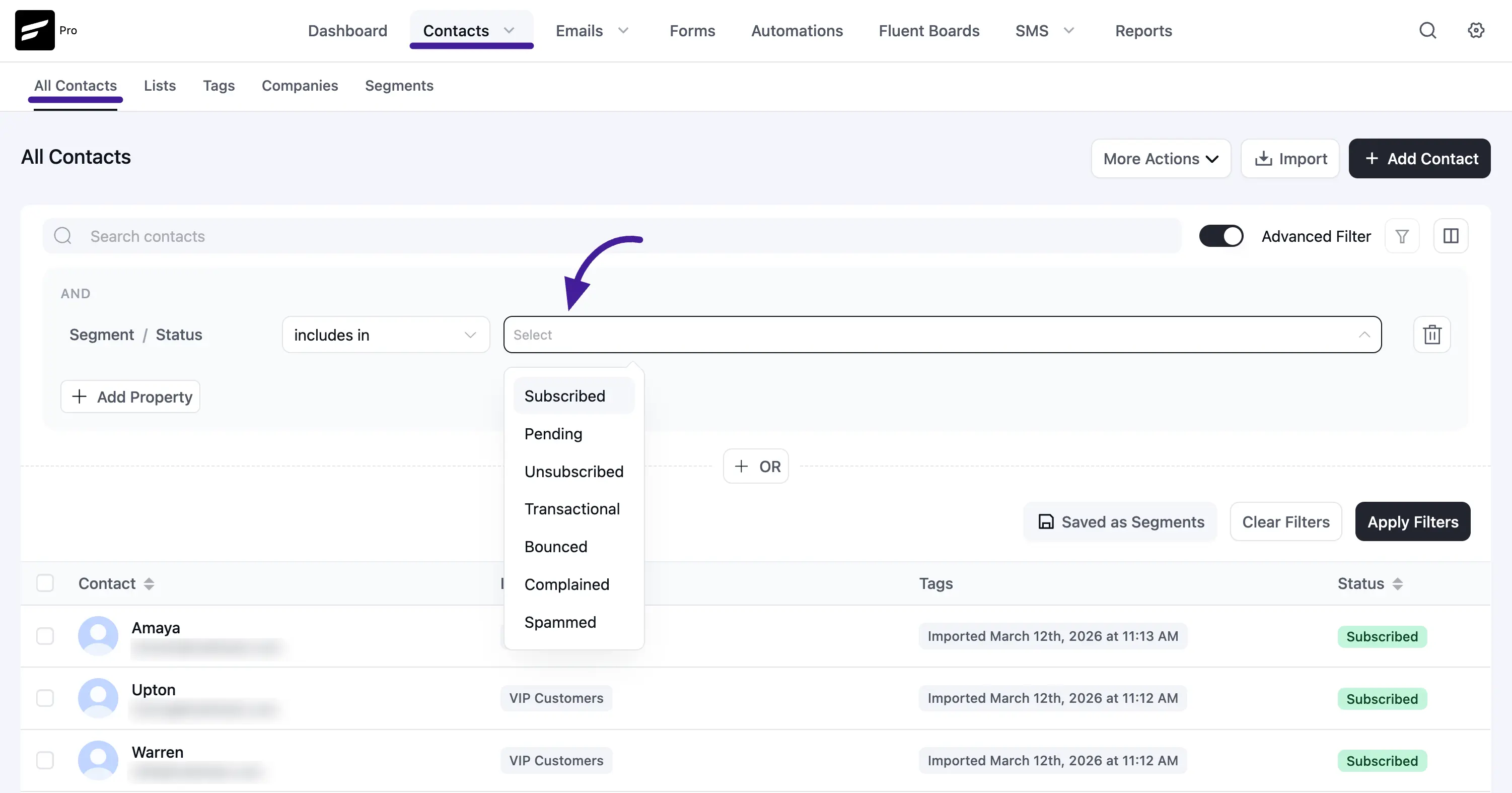
FluentCRM Contacts Status
In FluentCRM, every contact is assigned a specific "Status." This status acts as a label that tells the system exactly what kind of emails this person is legally allowed to receive (if any).
Statuses update automatically based on how your audience interacts with your emails, but you can also manage them manually or filter your list by these statuses.
Based on the latest FluentCRM interface, there are 7 distinct contact statuses. Here is exactly what each one means:
1. Subscribed
This is the golden status! These are your active, engaged contacts.
- What it means: This person has fully opted in to receive your marketing emails. If you use Double Opt-in, it means they clicked the confirmation link in their email.
- Who gets it: People who fill out your forms, purchase a product and check the "subscribe" box, or contacts you manually import and assign this status to.
2. Pending
Think of this as the "waiting room."
- What it means: The user interacted with your lead source (like filling out a form), but they haven't confirmed their subscription yet.
- Why it matters: By default, new contacts enter as "Pending" and are sent a Double Opt-in email. Until they click the confirmation link in that email, they will not receive your marketing broadcasts. This protects you from spam bots and keeps your list clean!
3. Unsubscribed
- What it means: This contact previously agreed to receive your emails but has now clicked the "Unsubscribe" link at the bottom of a campaign.
- Rule of thumb: FluentCRM will automatically prevent marketing emails from going to these users. Respecting this status is legally required.
4. Transactional
This is a critical status for e-commerce sites (like WooCommerce) or membership platforms.
- What it means: This person is a customer or user on your site, but they did not opt in to your marketing newsletter.
- What they receive: They will only receive essential, non-marketing emails triggered by their actions—like order receipts, password resets, or course enrollment confirmations. They will automatically be excluded from your promotional broadcasts.
5. Bounced
- What it means: You tried to send this person an email, but their email server rejected it.
- Why it happens: This occurs if the email address doesn't exist anymore (a fake address or a deleted account), their inbox is completely full, or their server is temporarily down. High bounce rates hurt your sender reputation, so FluentCRM stops sending to these addresses.
6. Complained
- What it means: This is a severe status. It means the user actively reported your email to their service provider (or network owner) as a violation.
- Why it matters: Complaints are highly damaging to your sender reputation. To avoid this, always ensure your lists are clean, you have explicit permission to email them, and your content provides value.
7. Spammed
- What it means: The contact explicitly clicked the "Mark as Spam" or "Junk" button in their email client (like Gmail or Outlook) when reading your email.
- What happens: FluentCRM flags them immediately to protect your domain reputation. You should not attempt to send marketing emails to these contacts again.