
Appearance
Cron Job: Basics & Checklist
FluentCRM processes scheduled tasks every minute — just like any other email marketing application. Reliable email delivery depends on a reliable cron job. This page covers the primary requirements for handing WordPress cron over to either a server-side cron or a remote alternative service.
What Cron Jobs Do?
Cron jobs are important because they allow for the automated execution of scripts and programs at specified intervals. This can be useful for tasks such as scheduling backups, sending notifications, or updating data. Cron jobs can also help to automate repetitive tasks and improve the efficiency of a system by removing the need for manual intervention.
FluentCRM Cron Job Status
FluentCRM has a few scheduled events and jobs that run frequently at various intervals.
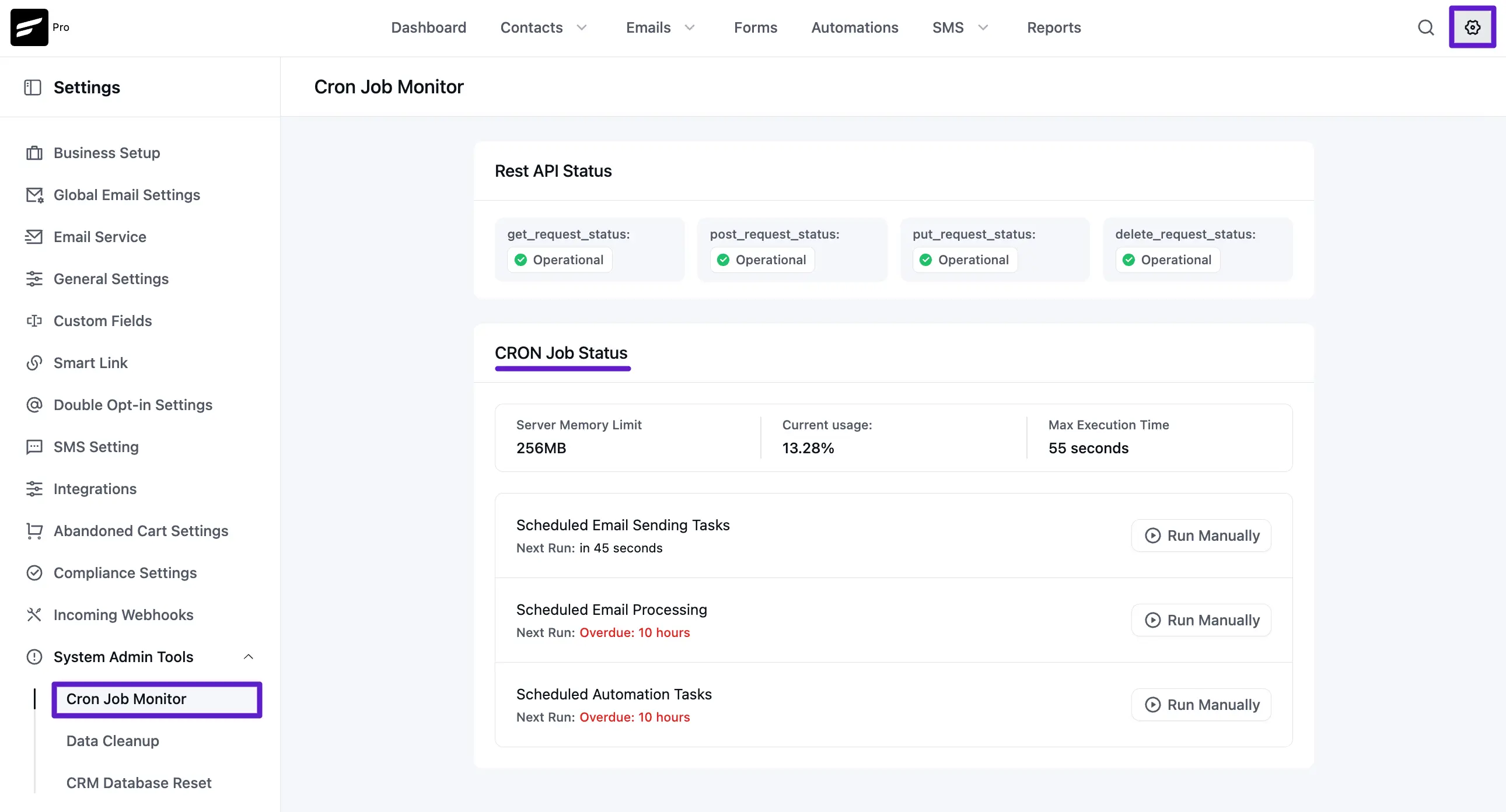
Go to Settings from the top navigation bar. Then, from the left sidebar, open the System Admin Tools section. Click on Cron Job Monitor to see the current status of FluentCRM cron jobs.
Recommended (We recommend) Intervals for Cron Job Status should be as below:
- Scheduled Email Sending: This should be between 1 second to 60 seconds (1 Minute).
- Scheduled Email Processing: This should be between 1 minute to 5 minutes.
- Scheduled Automation Tasks: This should be between 1 minute to 60 minutes (1 hour).
Replace the Default WordPress Cron System
By default, WordPress runs its scheduled tasks only when someone visits your site. On a low-traffic site, that means FluentCRM's email sending and automations stall or fire late. The fix is a two-step process: disable the default WordPress cron, then replace it with a real server-side cron that runs every minute.
WARNING
These two steps go together — do not stop after Step 1. Adding define('DISABLE_WP_CRON', true); on its own stops all scheduled tasks: WordPress no longer triggers cron at all, and FluentCRM (along with every other plugin that depends on cron) silently stops processing. You must also set up the real cron job in Step 2. If you can only do one, do neither.
Step 1: Disable the default WordPress cron
Open your wp-config.php file and look for this section:
/* Add any custom values between this line and the "stop editing" line. */

/* That's all, stop editing! Happy publishing. */
Add the directive between those two lines:
define('DISABLE_WP_CRON', true); // Disable the default PHP-based Cron invocation.The result should look like this:
/* Add any custom values between this line and the "stop editing" line. */

define('DISABLE_WP_CRON', true);    // Disable the default PHP-based Cron invocation.

/* That's all, stop editing! Happy publishing. */
Step 2: Add a real server-side cron job (required)
Now set up a cron job that triggers WordPress every minute. Follow the guide that matches your hosting:
- Cron Job: Replace with a Server-side Cron Job (cPanel)
- Cron Job: Set up on a VPS (SSH & Crontab)
- Cron Job: FluentCRM Cron With xCloud
- Cron Job: FluentCRM Cron With Cloudways
- Cron Job: FluentCRM Cron with Cron-job.org
- Cron Job: FluentCRM Cron with EasyCron
TIP
After setting up your cron, come back to Settings → System Admin Tools → Cron Job Monitor and confirm the intervals match the recommended values above. That's the fastest way to verify everything is running.